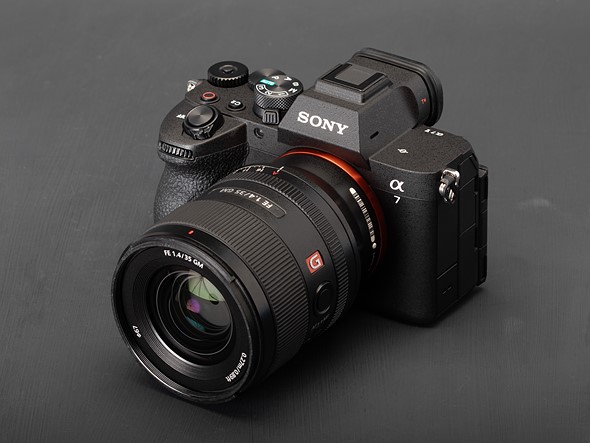
 |
Product photos: Mitchell Clark

The Sony a7 V is an enthusiast-tier camera with a new, full frame, 33MP ‘partially stacked’ CMOS sensor, with a focus on high burst rates, capable autofocus and a complete suite of video features.
Key Specifications
- 33MP full frame ‘partially stacked’ sensor
- IBIS rated to 7.5EV in the center
- AI-derived recognition for six subject types
- “Blackout-free” continuous shooting at 30fps
- Configurable pre-burst capture up to 1 second
- 3.2″ tilting/fully-articulating display
- Dual USB-C ports for power and data
- 4K up to 60p derived from 7K capture, 4K up to 120p with 1.5x crop
- AI-based auto-framing in video
Sony says the a7 V is available now with recommended retail price of $2899, body only, making it $400 more expensive than the Mark IV, back in 2021.
Index:
- What’s new?
- In context
- Body and handling
- Image quality
- Autofocus
- Video
- In-use
- Conclusion
- Sample gallery
- Press release
- Specifications
What’s new?
New sensor
 |
Like its predecessor, the a7 V features a 33MP sensor, but with extra readout circuitry to improve readout speeds (which were one of the a7 IV’s weak points). We’ve seen this “partially stacked” technology in 24MP cameras like the Nikon Z6III and Panasonic S1II, but here it’s being applied to a higher-resolution sensor.
Sony says this allows the a7 V to achieve much higher burst rates than its predecessor – 30 fps, up from 10 – and to do so with a full 14-bit readout, rather than requiring Sony’s destructively lossy Raw compression. The maximum e-shutter speed has been increased to 1/16000 sec, too. The company also promises it won’t have the same dynamic range reduction we saw with the Z6III, where increased read noise was evident if you pushed the shadows in post. Though we’ll have to see if these claims are borne out in testing.
The IBIS system has also been upgraded, now stabilizing the sensor by 7.5EV, up from 5.5EV with the a7 IV.
New processor, new autofocus
The sensor is paired with a new “Bionz XR2” processor, bringing Sony’s most up-to-date autofocus system to the a7 line. While the previous camera had human and animal recognition, the a7 V gets the autofocus system found on most of Sony’s other modern cameras, with support for recognizing six subject types, as well as a configurable ‘Auto’ mode.
 |
| The Subject Recognition: Auto mode can be fine-tuned so that it only looks for the types of subject you expect to encounter. You can also select how specific the focus is (eg whether it looks for birds’ eyes) |
The Human / Face / Eye recognition is significantly upgraded from the previous camera, with the a7 V trained to recognize humans in all sorts of different positions, so that it continues to track the same person and re-finds their face faster, even if they are partially obscured.
The camera also gains a few new focus area settings, and Sony says it performs autofocus calculations 60 times per second. (It hasn’t shared the a7 IV’s rate, but says the a1 II does 120 calculations per second.)
The processor is an update to the one found in Sony’s earlier cameras, such as the a1 II, a7R V and a6700, which paired their image processors with an “AI” coprocessor to handle autofocusing duties. Now, both functions are bundled onto one chip. Rather than providing for new features, this seems to be a play to make the system more efficient when doing the same tasks.
New Raw format
In among the new features, Sony says there’s a new, ‘lightweight’ Raw system. We weren’t given any more information than this, and there isn’t any third-party support for them, yet. The only thing we can say is that they end up being a similar size to Sony’s old, damagingly lossy Raw format, but hopefully without the potential pitfalls.
AI-powered features
Apart from autofocus, the new processor allows for several other features that are based on complex algorithms created by machine learning. The first is Auto Framing: a video mode that crops in and then follows your subject around the frame. This lets you set up a wide-angle shot, then have the camera pan around the scene to make it look like you had a camera operator. The feature offers three levels of crop and includes options to show the wide shot first before punching in shortly after your subject enters the frame.
There’s also a framing stabilizer option that uses the digital video stabilization to not only move a crop within the sensor to counteract shake, but also to maintain your subject’s position in the frame (either centrally or in a position you’ve defined). In both cases, the video is then upscaled to your chosen resolution.
Pre-burst capture
The a7 V gains the pre-burst capture system that first appeared in the a9 III. This lets you capture images for up to one second between the time you initiate AF and the time you fully press the shutter button. You get quite fine-grained control over the period of time before the full shutter press that gets retained. 1 second is the maximum, 0.03sec (i.e., 1 frame at the camera’s maximum 30fps) is the minimum, so you can tune it to match your response time, rather than always capturing a full second’s worth of images prior to full-press.
Despite the minimum duration being based on 30fps shooting, you can use pre-burst with any of the camera’s shooting rates.
A video upgrade
The faster sensor lets the a7 V capture most of its video modes at up to twice the framerates its predecessor could deliver. It also gains the auto-framing and framing stabilizer modes discussed above.
There are a few other nice-to-haves, too, such as the option to upload your own LUTs to let you preview the scene with your intended grading. The camera can also embed the LUT alongside your footage, so that it’s also available to whoever’s editing the project. However, unlike the FX series cameras, there’s no option to simply burn the LUT onto your video.
In context
The a7 V lands in the most competitive part of the market: between the out-and-out pro models and the somewhat pared-back entry-level models. This puts it up against some very good opposition: the recently-released Canon EOS R6 III, the recently firmware-boosted Panasonic S1II and Nikon’s Z6III.
We don’t have room to compare all five here, so we’re going to include the more expensive Panasonic S1II here, as it’s built around a similar sensor to the Nikon Z6III but gets a bit more out of it, in terms of image quality, video and speed. We’ll include more about the Nikon in a follow-up article, soon.
| Sony a7 V | Sony a7 IV | Canon EOS R6 III | Panasonic DC-S1II | |
|---|---|---|---|---|
| MSRP (US/UK) | $2899 / £2799 | $2699 / £2400 | $2799 / £2799 | $3199 / £2899 |
| Sensor type | Partially stacked CMOS | BSI CMOS | Dual Pixel AF FSI CMOS | Partially stacked CMOS |
| Resolution | 33MP | 33MP | 33MP | 24MP |
| Viewfinder res/ magnification/eyepoint | 3.69M dot 0.78x 23mm |
3.69M dot 0.78x 23mm |
3.69M dot |
5.76M dot |
| Rear screen | 3.2″ 2.09M dot Tilt + Fully articulating |
3.0″ 1.04M dot Fully articulating |
3.0″ 1.62M dot Fully articulating |
3.0″ 1.84M dot Tilt + Fully articulating |
| Image stabilization | 7.5EV | 5.5EV | 8.5EV* | 8EV |
| AF subject detection |
|
|
|
|
| Maximum burst rate | 10fps mech. 30fps e-shutter (14-bit) |
10fps mech./e-shutter |
12fps mech. |
10fps mech. |
| Pre-burst capture? | Variable, up to 1 sec | No | Yes, up to 0.5 sec | Yes, up to 1.5 sec |
| Stills rolling shutter rate (ms) | ∼15.1ms | ∼67.6ms | ∼13.5ms (12-bit) | ∼14.6ms |
| HDR still output | HLG HEIF (no Raw) | HLG HEIF (no Raw) | PQ HEIF | HLG HEIF |
| Video resolutions |
UHD 4K/60 (full-width, oversampled) |
UHD 4K/30 (full-width, oversampled) UHD 4K/60 (1.5x crop) |
7K DCI/60 (Raw) 7K/30 open-gate 4K/120 (full-width, oversampled ≤60p) 1080/180 (full-width) |
6K/30 3:2 (Raw / open gate) |
| Raw video (internal) | No | No | C-Raw | ProRes Raw |
| Video assist tools |
Log view assist |
Log view assist | Waveform False color Log view assist Custom LUTs |
Waveform False color Vectorscope Anamorphic desqueeze Shutter angle Log view assist Custom LUTs |
| Media types |
1x CFexpress type A/UHS-II SD |
1x CFexpress type A/UHS-II SD 1x UHS-II SD |
1x CFexpress Type B 1x UHS-II SD |
1x CFexpress Type B 1x UHS-II SD |
| Battery life EVF / LCD | 630 / 750 | 520 / 580 | 270 / 510 | 310 / 350 |
| Dimensions | 130 x 96 x 72mm | 131 x 96 x 80mm | 138 x 98 x 88mm | 134 x 102 x 92mm |
| Weight | 695g (24.5oz) | 658g (23.2oz) | 699g (24.7oz) | 800g (28oz) |
* When combined with a stabilized lens
The table works as a striking illustration of just how far behind the latest generation of cameras the a7 IV was, a situation the a7 V has mostly rectified. Sony’s E-mount also remains a leader in terms of openness and the availability of a wide range of first and third-party lenses, though it’s worth noting that several big players have recently promised to start producing options for L-mount. Sony also only allows third-party lenses to continuously autofocus at 15fps and below, a limitation that wasn’t a factor on the a7 IV, but that a7 V users may bump up against.
Other companies are also offering more video options than Sony; both the Canon EOS R6 III and Panasonic S1II have modes for open-gate recording, DCI 4K and internal Raw video, all of which the a7 V lacks. Sony also hasn’t implemented exposure assistance tools such as a waveform monitor or false color overlay, though it has AI tricks that Canon and Panasonic don’t offer.
Body and handling
 |
The a7 V uses an updated version of the body from the a7 IV. This means it has two main command dials, a toggle-lockable exposure comp dial on its shoulder and a third, fiddly command dial on its rear plate. However you wish to shoot, the a7 V can be set up to put the parameters you care about at your fingertips.
The front grip has been redesigned to make it feel more comfortable, though it doesn’t gain the tilted-forward shutter button design that the company’s pro-grade a9 III and a1 II benefit from.
We’re still not great fans of the new grip: it’s large enough, but the two of us shooting with the camera both found it dug into our fingers a little. This isn’t helped by the unyielding grip texture on the camera that does nothing to cushion the hand.
Menus
 |
| The a7 V uses Sony’s latest generation menus, which are certainly an improvement on the ones used in earlier models. They definitely have their foibles still, though. |
The a7 V uses Sony’s newer menu system, which represented a big step forward from the a7 III. It’s been updated slightly from the previous model through the addition of a Home/Status Panel screen at the top of the menu. We’re not fans, as it’s easy to navigate away from by mistake (not ideal for quick settings changes), and it can get in the way of reaching the actual menus. The ability to minimize it as you navigate to the left-hand tabs serves no obvious purpose, beyond reinforcing the sense that it’s a potentially good idea shoehorned into a context where it doesn’t quite fit.
As with any menu system, you can learn it in time, or use the My Menu system and Fn menu to circumvent the need. But the a7 V’s very high level of customization comes with the price of a long, complex menu frequently featuring an odly trunctd nmng systm.
EVF / rear screen
 |
The a7 V uses the same 3.69M dot viewfinder as its predecessor, with the optics giving 0.78x magnification. By default the viewfinder doesn’t use a feed that uses the full 1280 x 960px resolution of this panel. Depending on your requirements, you can either push the panel into a higher speed or a higher resolution mode (though not both). Either option will have an impact on the battery life.
It gains a tilting cradle on which its slightly larger, fully articulated rear screen is mounted. This means it can be tilted up or down, close to the back of the camera for waist-level or overhead stills shooting as well as flipping out to the side for videos or selfies. The added movement also lets you move the screen away from the camera, reducing the risk of the screen fouling your cables when you flip it out. The new panel has around 2.1M dots, giving around a 1024 x 682px resolution.
Flipping the screen out over-rides the viewfinder’s eye sensor by default, so the rear screen won’t black-out if you bring the camera too close to your body when working at waist level. We had occasional issues getting the finder to work when the screen was re-stowed, though (closing the screen seems to put the camera to sleep).
USB ports
 |
The a7 V becomes the second camera we’ve encountered to have two USB-C ports: one for high-speed data transfer, one for charging, using the USB-PD standard. It’s worth remembering which is which: the upper port can transfer files at up to 10Gbps, the lower one is around one twentieth of this speed.
It’s perhaps noteworthy that many recent Sony cameras had retained a USB Micro B socket alongside their USB-C data port, to maintain compatibility with the company’s “Multi Terminal” accessories. The second slot on the a7 V appears to essentially be a continuation of this USB 2.0 socket in a new shape.
Battery
 |
The a7 V uses the same NP-FZ100 battery that the a7 series has used for several generations, now. It’s a fairly substantial 16.4Wh unit that powers the camera to a rating of 750 shots per charge if you rely on the rear screen and 630 shots per charge if you use the viewfinder.
These are both impressive figures for a camera in this class, especially given that the CIPA-defined tests tend to significantly underestimate the number of shots most people find they actually get. Everyone’s usage differs, of course, but so long as you don’t spend lots of your time reviewing the images you just shot, it’s not unusual to get double the rated number of shots.
Image quality
Our test scene is designed to simulate a variety of textures, colors, and detail types you’ll encounter in the real world. It also has two illumination modes, full even light and low directional light, to see the effect of different lighting conditions.
Comparing processed Raws at base ISO, the a7 V’s 33MP sensor provides a similar level of detail to cameras with similar resolutions, such as its predecessor and Canon’s EOS R6 III, while offering a bump up from its 24MP competitors. It appears Sony has slightly tweaked the formula for the camera’s color response compared to the a7 IV, and we’ve liked the JPEG results we’ve got.
At high ISOs, the a7 V’s Raws show a touch more noise than those of its competition, a trend that continues as you push your ISO higher, but its JPEG engine does a decent job of reducing noise while still retaining details. Its ISO range extends a stop higher than the Canon EOS R6 III’s, but in most circumstances, this simply means you have a wider range of settings that provide an unusable image.
Overall, the a7 V’s images are very similar to the a7 IV’s, but its partially stacked sensor brings better low-ISO dynamic range and burst rates without any noticeable impact on image quality. Though these two benefits aren’t delivered simultaneously: maximum DR can’t be achieved in the camera’s fastest modes, which use electronic shutter.
Dynamic range
The a7 V gets a significant boost in its dynamic range, compared with its predecessor, thanks to sensor that’s able to combine the output of both its dual conversion gain readout modes, meaning you get the same highlight performance as before but with less noise in the shadows. Specifically, it gets a boost in its lower ISO settings, where dynamic range is highest and where you’re most likely to want to use it.
All the benefit appears in the deep shadows: the relationship between the sensor’s clipping point and the camera’s metering (and JPEG middle gray) is the same as on the a7 IV, so there’s the same amount of highlight headroom as before. Increased DR means there are darker tones that remain usable in this camera’s Raw files than the ones that have been overwhelmed on cameras with lower DR. So if you aren’t pushing your Raws to exploit the information in the deep shadows, you won’t encounter this benefit.
This combined dual gain mode is only active in modes where the mechanical shutter is closed at the end of the exposure (ie: mechanical and electronic first curtain modes) so that there’s no impact from the slower read-out in these modes.
Video
 |
The Sony a7 V records full-width UHD 4K footage at up to 60p, downsampled from 7K capture, and also offers 4K 120p recording from an APS-C-sized region of the sensor.
The camera can also use the sensor’s extra resolution to power its AI Auto Framing mode, which will recognize a human in the scene and crop in on them, like a camera operator might if they were zooming in and panning around to keep a subject in frame. You can configure how tight you want the framing to be and how quickly you want the camera to move the frame to keep up with the subject. Similarly, the highest tier of digital stabilization also has a ‘Framing Stabilizer’ option, which aims to keep your chosen composition locked onto a selected subject, even while the camera is moving.
There’s also a slight caveat to the full-width 4K/50 and 60 modes; to actually get full-width recording, you have to turn on a mode called “4K Angle of view Priority,” which Sony says turns off in-camera noise reduction.
Sony includes its S-Log3 and S-Cinetone color modes in the a7 V. The former is designed to capture as much dynamic range as possible, but will require color grading before delivery, while the latter is designed to have a subtle, movie-like appearance that’s flat enough to provide a little editing latitude. You can also shoot in Hybrid Log Gamma (HLG) mode to deliver output-read HDR footage for playback on high dynanic range devices.
Recording Modes
Compared to its competitors, the a7 V actually has relatively few recording modes, since it only records compressed, 16:9 video. However, it offers a few choices of codecs and compression types, which you can choose between depending on what you’re shooting and how capable your editing computer is.
| Resolution | Rates | Crop | XAVC type | ||
|---|---|---|---|---|---|
| HS | S | S-I | |||
| UHD 4K (3840 x 2160) |
23.98 | 1.0x | Yes | Yes | Yes |
| 25, 30 | 1.0x | Yes | Yes | ||
| 50, 60 | 1.0x / 1.17x * | Yes | Yes | Yes | |
| 100, 120 | 1.52 / 1.79x * | Yes | Yes | ||
| Full HD (1920 x 1080) |
23.98, 25, 30, 50, 60 | 1.0x | Yes | Yes | |
| 100, 120 | 1.0x | Yes | |||
*Depending on “4K Angle of view priority” setting.
Sony’s menus for choosing your recording mode aren’t the nicest to navigate, but they get the job done. You start by choosing your file format to determine your resolution and compression, and which are named using Sony’s XAVC branding, decrypted as follows:
- XAVC HS = 4:2:0 10-bit, H.265 Long GOP
- XAVC S = 4:2:0 8-bit, H.264 Long GOP
- XAVC S-I = 4:2:2 10-bit, H.264 All-I
Then, you can go into a separate menu to choose your frame rate and bit rate/depth and chroma subsampling settings.
Temperature limits
While the a7 V doesn’t have a fan, it has the graphite heatsink introduced with the a7S III built into the IBIS unit for better thermal performance in the camera’s more demanding video modes. At roughly room temperature (20°C, 68°F), the company says you can expect to get around 90 minutes of recording time at 4K/60. At a torturous 41°C (105°F), the company claims it should still be able to manage up to 60 minutes of 4K/60. Though it doesn’t specify, we assume these figures are for indirect heat and with the overheat warnings relaxed.
Video performance
The Sony a7 IV paid a price for its move to a higher-res sensor, when it came to video. Although its detail capture level was a touch higher, it took longer to read out, so exhibited more rolling shutter. That’s not a problem for the Mark V: its partially-stacked sensor read out significantly faster, which both reduces rolling shutter and allows full-width 4K/60p capture.
However, it’s working at its limit to do so, though, hence the need to reduce noise reduction if you want to shoot 4K/50 or 60 and continue to use the full width of the sensor, or to use the standard APS-C region for 4K/100 and 120.
The Sony’s main 4K modes are derived from full-width, 7K output. This means they correspond to { ImageComparisonLink:6300, text=”Canon’s “HQ” modes” } on the EOS R6 III, rather than its standard, sub-sampled modes. Its higher res sensor makes it a little more detailed than Panasonic’s S1 II.
The a7 V only captures footage in output-ready resolutions and aspect ratios (primarily UHD 4K), so you can’t gain the ability to crop and reframe that other cameras offer, but most of its 4K output modes make makes use of the sensor’s full resolution.
One exception is the 4K/60 mode with angle-of-view priority turned off. This uses a slightly cropped region of the sensor and captures a fraction less detail as a result (we absolutely would not expect such a minor difference to be visible when cutting to/from this footage). There’s no sign of a difference in noise in this image, shot at low ISO but a single frame grab can’t show differences in temporal noise reduction, applied to reduce noise difference frame-to-frame.
| Crop | Rolling shutter rate | |
|---|---|---|
| 4K/24 | 1.00 | 14.5ms |
| 4K/60 Aov Priority On | 1.00 | 13.3ms |
| 4K/60 Aov Priority Off | 1.17 | 14.7ms |
| 4K/120 Aov Priority Off | 1.79 | 7.1ms |
Another mode that doesn’t use the full resolution is the 4K/120 mode. This is taken from an APS-C region of the sensor and still uses fractionally more capture pixels than the output resolution, so it remains detailed. However, the nature of using a smaller region of the sensor, plus the shorter exposures used for 120p capture means it’ll be noisier. Again you’ll need to use the angle of view priority option to avoid a slightly larger crop (1.79x vs 1.52).
Sony’s in-body image stabilization is pretty good in video, but the better results tend to be achieved by applying at least some degree of digital correction, which comes with a crop. You have a series of choices: the basic level that tends to work pretty well if you’re trying to keep the camera still and a more extreme mode, accompanied by an even great crop, if you’re trying to smooth-out significant amounts of movement.
Dynamic range
Unlike the Panasonic S1II, the Sony doesn’t have any DR Boost mode or equivalent that lets you trade off speed for greater dynamic range by combining the output of both its sensor’s gain modes. Instead, you just get the fast mode, which is a distinct benefit over its comparatively tardy predecessor, but you don’t get the DR benefits we saw in stills mode.
The Sony is missing a couple of features that rivals such as the Panasonic S1II and Canon EOS R6 III offer, most obviously the ability to capture native resolution video, Raw video and the option to output in taller aspect ratios to give you more cropping options during the edit.
These are both potentially useful features to some users but we wouldn’t expect either to be essential for many people. If either is a feature you need, you should look elsewhere, but a lot of users won’t need them at all, so it’s worth being realistic with yourself about how you intend to use a camera.
Autofocus
The a7 V uses the latest iteration of Sony’s AF system. It works very well, but having some familiarity with an existing version definitely helps.
 |
| You can narrow down the number of AF area modes available, if you find the choice of 24 at all overwhelming. |
As with most cameras you get a choice of AF area modes, from a small square box up to “Wide” area, which covers the whole scene and lets the camera pick a subject. One of the first things we’d suggest doing is moving the camera from AF-A mode (where it tries to pick between single AF acquisition and continuous AF), into AF-C, because that gives you access to tracking versions of all the AF areas.
There’s a menu option to limit which AF area modes are available, to bring things back to a quickly manageable selection, and we’d recommend doing this, once you have a sense for the modes you prefer to use.
The tracking tends to work very well and for a lot of photography we find we can leave the camera in AF-C with a small or medium-sized tracking box, and it’ll focus on what we ask, whether the subject is static or moving and regardless of how we adjust the composition, after picking a subject.
Subject recognition
|
| You can choose a specific target type to track or select the Auto mode that chooses between them. You can filter the list of subjects available in the menus and which subjects the Auto mode selects from. |
The a7 V has a series of subject recognition modes derived from machine learning. It adds several additional subject types that the a7 IV hadn’t been trained to recognize and also adds and ‘Auto’ subject mode that will try to hunt for multiple subject types. This Auto mode can be fine-tuned so that it only tries to look for the specific subject types you want to photograph, which should improve speed and help prevent the camera getting distracted.
Subject recognition modes will only focus onto subject under or near to your chosen AF point, so you can leave subject recognition on, without having to worry about the camera focusing off on a recognized subject, if you’re trying to focus on somethign else in the scene.
 |
| You can fine-tune the behavior of each subject recognition mode to get it to precisely match your shooting style and the conditions in which you shoot. The defaults already work very well, we found. |
You can fine-tune each subject type, to adjust how close to your AF area a subject has to be, before it locks onto it. So, for instance, you could limit human detection to having to be very close to your AF point, while casting a wider net in bird detection mode, to give you more leeway if you can’t keep your AF point precisely over a flying bird. This setting is called “Tracking Shift Range.” Several subject types can be fine-tuned to make sure the camera focuses exactly where you want it to.
The good news is that this level of per-subject fine-tuning is just that: the ability to further hone the behavior, if you have specific needs. The a7 V’s default behavior is already very good.
Likewise, the camera lets you specify how it should respond if something crosses in front of the subject being focused on (which you may need to configure differently, if you’re shooting certain sports), but for most shooting you can just leave it at its defaults.
Overall the autofocus works very well. Hidden behind some often rather opaque naming, there’s the ability to customize it to a pretty fine degree. The good news is that for a lot of photography, it already works very well without you having to do this.
In use
By Richard Butler
 |
| The a7 V’s buttons and dials are well positioned but something about the shape of the new grip really makes the camera’s weight apparent when holding it for any length of time, despite it being no heavier than its peers. |
We’ve always said the Sony user interface benefits most from a little customization: even with their improved (but already overstuffed) left-tabbed menus, you’ll want to spend as little time in the main menus as possible. This process of working out which features you want to access quickly via buttons or semi-quickly via the quick menu is made all the more pressing by the a7 V’s broad range of capabilities. It’s very unlikely that any one photographer will use all of all the camera’s features, so it makes sense to surface the features that make sense for your use.
 |
| The camera’s Fn menu is completely customizable. But note that it includes the ‘pre-burst’ option that isn’t even available by default. You’ll need to change both the shutter type and drive mode before it becomes selectable. |
By default, the quick menu has pre-burst shooting as one of its options. But to engage that you need to also be in e-shutter and burst shooting modes, so there’s quite a lot of setting changes to access the camera’s new feature. Likewise, if you encounter a scene you think would work well as a high DR image, you’ll need to disengage Raw shooting, select HEIF as your output type and then select HLG photo mode, then reverse all those changes when you want to shoot Raws again.
None of this is insurmountable: you can configure the custom positions on the mode dial to engage these modes and make all the settings changes necessary, but it means more setup and configuration than we’d really like to see, or than we’d expect to have to do with its peers.
 |
|
Personally, I find it rather unhelpful to have a settings panel within the main menu structure: it’s too easy to navigate away from accidentally, to be useful as a settings panel so it’s just clutter, the rest of the time. I find it even more unhelpful that one of the ways you can inadvertently navigate out of it is to this intermediate page. I have no idea why this step exists between the setting page and the tabs on the left. |
The differences between the mid-range cameras from the major brands become narrower and narrower, all the time. Lens selection, in terms of the specific lenses you want, at a price/performance level you’re happy with (not just number of lenses available) should probably be a bigger deciding factor between brands than most slight differences between specs or feature sets.
For me, the a7 V’s grip would put me off it, as would the lack of ability to re-process the Raws, in-camera, while I’m traveling. But this is the level of specific personal preference that will dictate which camera you opt for.
There are few knockout punches being thrown, so it’s all in the realm of the points totals of individual judges. Ignore anyone babbling on about the lack or presence of this feature or that unless you are absolutely certain that you will use one of those specific features, because all of these cameras have almost everything most people might need.
Conclusion
By Richard Butler
| Pros | Cons |
|---|---|
|
|
The a7 V is perhaps the best all-round camera Sony has yet made, outside its pro-grade (and priced) models, excelling at both stills and video capture. Like its immediate peers, it brings a level of performance that exceeds what professionals relied on, less than a decade ago, meaning you get a camera that will support you almost regardless of what you ask it to do.
The latest sensor has been cleverly used so that it brings a dynamic range benefit for photographers who need to really push their files, while also delivering a speed improvement over its predecessor, giving smoother, better quality footage and less rolling shutter distortion at its fastest burst rates.
 |
|
The a7 V’s autofocus is very good in a wide range of circumstances. You can fine-tune the behaviour and simplify things if you want. But for most people, simply engaging AF-C when they first get the camera will be the only essential setup step. Sony 85mm F1.4 GM II | F2.2 | 1/100 sec | ISO 640 |
Autofocus strikes a good balance between capability and tunability: there are countless options to fine-tune it to get exactly the behavior you want, but its performance out-of-the-box is so good that this is a question of achieving a final, perfect polish, rather than being a necessary step you have to overcome.
Sony’s interface still isn’t our favorite, and can feel cluttered and unruly at times, especially as features and interdependencies continue to grow. But it can be learned and customized easily enough that this won’t be a concern, once you’ve got yourself up to speed. Similarly, more than one of the team found the camera’s grip shape and weight made it hard to hold for long periods. Overall, ergonomics and usability are, perhaps, the closest the a7 V has to a weak-point.
If you’re an existing E-mount user, the a7 V is likely to represent an appreciable upgrade
If you’re an existing a7 or a7C-series user, the a7 V is likely to represent an appreciable upgrade, with the benefits being more apparent the older the model you have (for a7IV users, the benefits would mostly be felt by keen video shooters). For new buyers without any commitment to a system, the E-mount’s extensive choice of lenses is another factor in its favor.
The a7 V is more camera than most of us will ever need, and it’ll support you almost regardless of what you ask it to do. It’s hard to see any basis for awarding it less than our highest award.
Scoring
Scoring is relative only to the other cameras in the same category. Click here to learn about what these numbers mean.
|
Sony a7 V
Category: Semi-professional Full Frame Camera
|
|
Build quality
Ergonomics & handling
Features
Metering & focus accuracy
Image quality (raw)
Image quality (jpeg)
Low light / high ISO performance
Viewfinder / screen rating
Performance
Movie / video mode
Connectivity
Value
|
PoorExcellent
|
||||
|
Conclusion
The a7 V is a spectacular all-rounder, with advanced autofocus, excellent dynamic range or fast shooting and impressive 4K video. Its interface and ergonomics count against it and some video specialists might find its feature set a little shallow. For most people it'll be more camera than they'll ever need.
|
|||||
|
|||||
|
|||||
RegularScoreCompareWidget({“mainElementId”:”scoringWidget”,”mainProduct”:”sony_a7v”,”scoringSchema”:{“id”:”SLRs”,”variables”:[{“id”:”BuildQuality”},{“id”:”ErgonomicsAndHandling”},{“id”:”Features”},{“id”:”MeteringAndFocusAccuracy”},{“id”:”QualityRaw”},{“id”:”QualityJpeg”},{“id”:”LowLightHighISO”},{“id”:”ViewfinderScreenRating”},{“id”:”Optics”},{“id”:”Performance”},{“id”:”Movie”},{“id”:”Connectivity”},{“id”:”Value”}],”categories”:[{“id”:”EntryLevel”,”label”:”Entry Level Interchangeable Lens Camera / DSLR”,”shortLabel”:”Entry Level”},{“id”:”MidRange”,”label”:”Mid Range Interchangeable Lens Camera / DSLR”,”shortLabel”:”Mid Level”},{“id”:”EntryLevelFullFrame”,”label”:”Entry Level Full Frame Camera”,”shortLabel”:”Entry Level Full Frame”},{“id”:”MidRangeFullFrame”,”label”:”Mid Range Full Frame Camera”,”shortLabel”:”Mid Range Full Frame”},{“id”:”SemiProfessional”,”label”:”Semi-professional Interchangeable Lens Camera / DSLR”,”shortLabel”:”Semi-professional”},{“id”:”SemiProfessionalFullFrame”,”label”:”Semi-professional Full Frame Camera”,”shortLabel”:”Semi-professional Full Frame”},{“id”:”Professional”,”label”:” Professional Interchangeable Lens Camera / DSLR”,”shortLabel”:”Professional”},{“id”:”LargeSensorCompactEntry”,”label”:”Entry Level Large Sensor Compact Camera”,”shortLabel”:”Entry Level Large Sensor Compact”},{“id”:”LargeSensorCompactEnthusiast”,”label”:”Enthusiast Large Sensor Compact Camera”,”shortLabel”:”Enthusiast Large Sensor Compact”},{“id”:”VideoCamera”,”label”:”Video Camera”,”shortLabel”:”Video Camera”}]},”helpText”:”Choose one or more cameras from the drop-down menu, then roll your mouse over the names to see how their scores compare to the camera on review.”})
Compared to its peers
The Canon EOS R6 III is the greatest challenge to Sony. It has shorter battery life and a narrower selection of lenses, but it also has a more comfortable grip and an interface that seems to struggle less with the extent of its feature set. It’s this enjoyability, rather than relatively niche video features, such as Raw capture and open-gate recording, that would make us lean towards the Canon. But it should present a challenging decision, if you’re not yet committed to a system, and you’re unlikely to feel you’ve made the wrong decision, whichever way you jump.
Like the Sony, the Panasonic S1II has a “partially stacked” sensor that can combine the output of its dual gain readout modes to give improved dynamic range. Unlike the Sony it also lets you do this in video mode, letting you choose between speed and DR. It also has a broader range of video output resolutions. Its autofocus isn’t quite as foolproof as the Sony’s, but the difference is much smaller, with the latest firmware, and the L-mount system has an increasingly interesting range of lenses, making the S1 II probably the stronger choice if you’re interested in video.
Nikon’s Z6III risks being somewhat overshadowed by its more recent peers, as it can’t combine the output of its dual gain modes, despite using a similar sensor to the Panasonic. It lower dynamic range won’t be apparent for most photographers but landscape shooters and anyone trying to push their Raw video may start to encounter some of the Nikon’s limitations. For most use it’s excellent, though, with nicer ergonomics and arguably a better interface than the Sony. Though, as with the Canon, your lens choice is quite tightly controlled.
Sony has a habit of keeping its existing bodies in the lineup for some time, so it’s worth comparing the a7 IV to the newer model. We much prefer the newer camera: it can shoot faster, has much improved video and upgraded autofocus. It’s better in almost every regard. If you have any E-mount lenses, we think it’s worth saving for the V, almost regardless of what you plan to shoot.
Sample Galleries
Please do not reproduce any of these images on a website or any newsletter/magazine without prior permission (see our copyright page). We make the originals available for private users to download to their own machines for personal examination or printing (in conjunction with this review); we do so in good faith, so please don’t abuse it.